



Developers
A website planning API for your own scripts and tools
Read and change projects with personal API keys, and get signed webhooks when pages, content or workflow change. The same roles, locks and limits as the app.


Plans that other systems can’t read
Product data lives in one system, the build pipeline in another, and the website plan in a document nobody can script. Keeping them in step means copying by hand.


An API built on the same rules as the app
The PagePot website planning API exposes projects, the sitemap, page content, workflow, comments and files over REST. Webhooks tell your systems what changed, so they can fetch the details.
Keys that act as you
A key can only do what your project roles allow. Changes made with it show in the project history as yours, “via API”.
Safe by default
Page locks, revision checks and idempotency keys mean a script never overwrites someone’s work or repeats a change.
Signed webhooks
Every delivery carries an HMAC-SHA256 signature, and failed deliveries are retried in order.
What the website planning API covers
Personal API keys
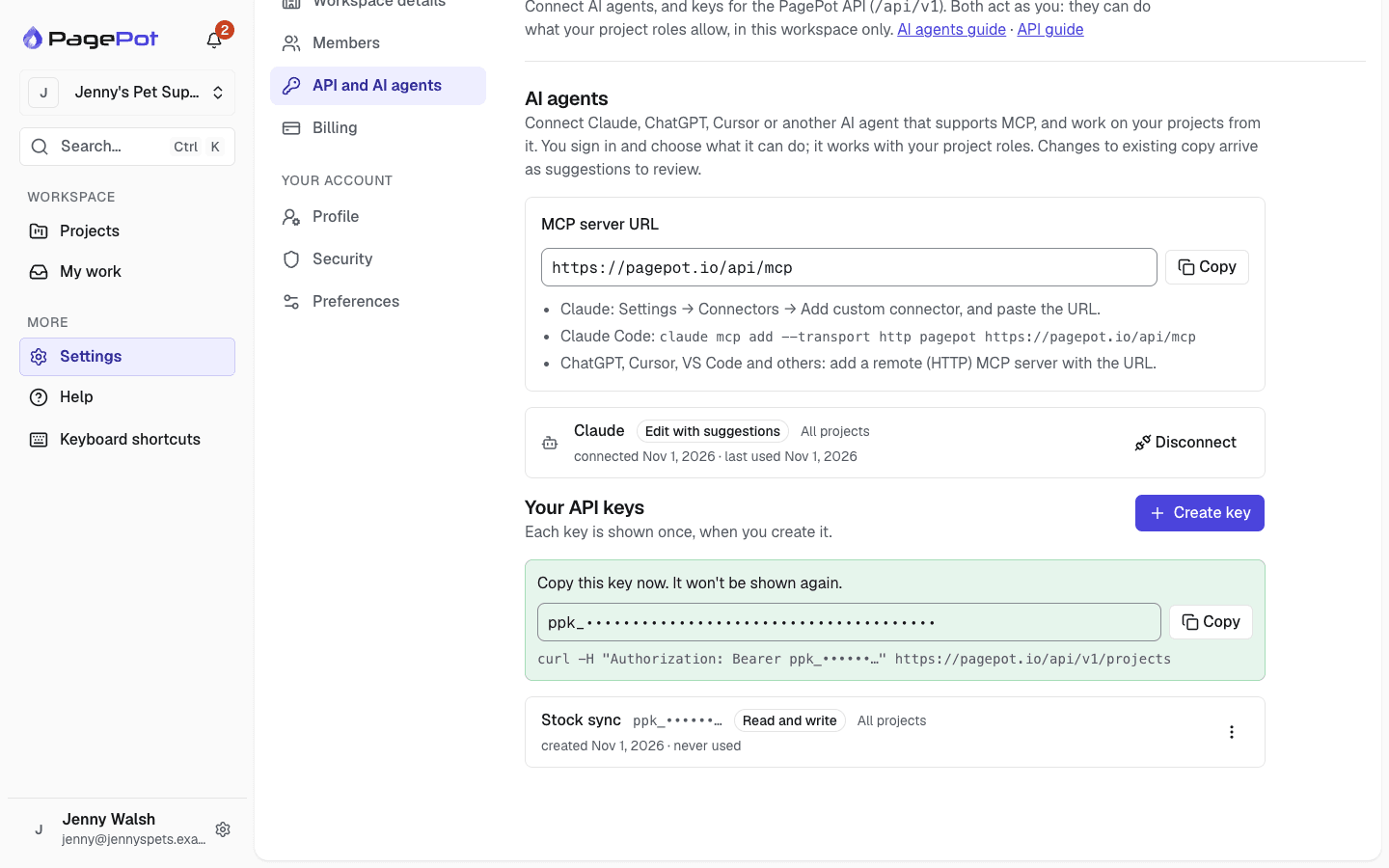
Everyone in the workspace can create keys in Settings → API and AI agents. Choose read only or read and write, and all your projects (including new ones) or only the projects you pick. Keys start with ppk_ and are shown once.
- Up to 25 keys per person
- Revoke a key at any time; workspace admins can see and revoke everyone’s keys
- Keys stop working when you leave the workspace
REST v1 endpoints
The API lives at /api/v1 and answers in JSON. A full OpenAPI description is at /api/v1/openapi.json, so tools such as Postman can import it.
- Projects: list, read and update
- Sitemap: add, change, move, delete and restore pages
- Page content: blocks, SEO and metadata, in any project language
- Workflow: status, assignees and due dates
- Comments: list, add, reply, edit and resolve
- Reference data: templates, statuses, metadata schemas and members
- Files: list, upload and download
- Activity history and webhook management
Rich text as JSON or HTML
Rich text comes back both in the editor’s JSON format and as HTML. Save it either way: HTML keeps headings, lists, links, tables, bold and italic, project images and YouTube or Vimeo videos.
- Add mode “suggest” to propose a change as tracked suggestions for editors to review
An MCP server for AI agents
The same projects, sitemap, content, workflow and comments are available to AI agents through PagePot’s MCP server at /api/mcp. People connect Claude, ChatGPT or Cursor by signing in to PagePot; developers can also send a personal API key as a bearer token from Claude Code, Cursor or their own agent.
- 20 tools and 3 prompts, with rich text as Markdown
- Changes to existing copy arrive as tracked suggestions unless the connection may edit directly
- OAuth 2.1 with PKCE, Client ID Metadata Documents and dynamic registration
- Streamable HTTP, for the current MCP specification and earlier clients
Signed webhooks from the activity feed
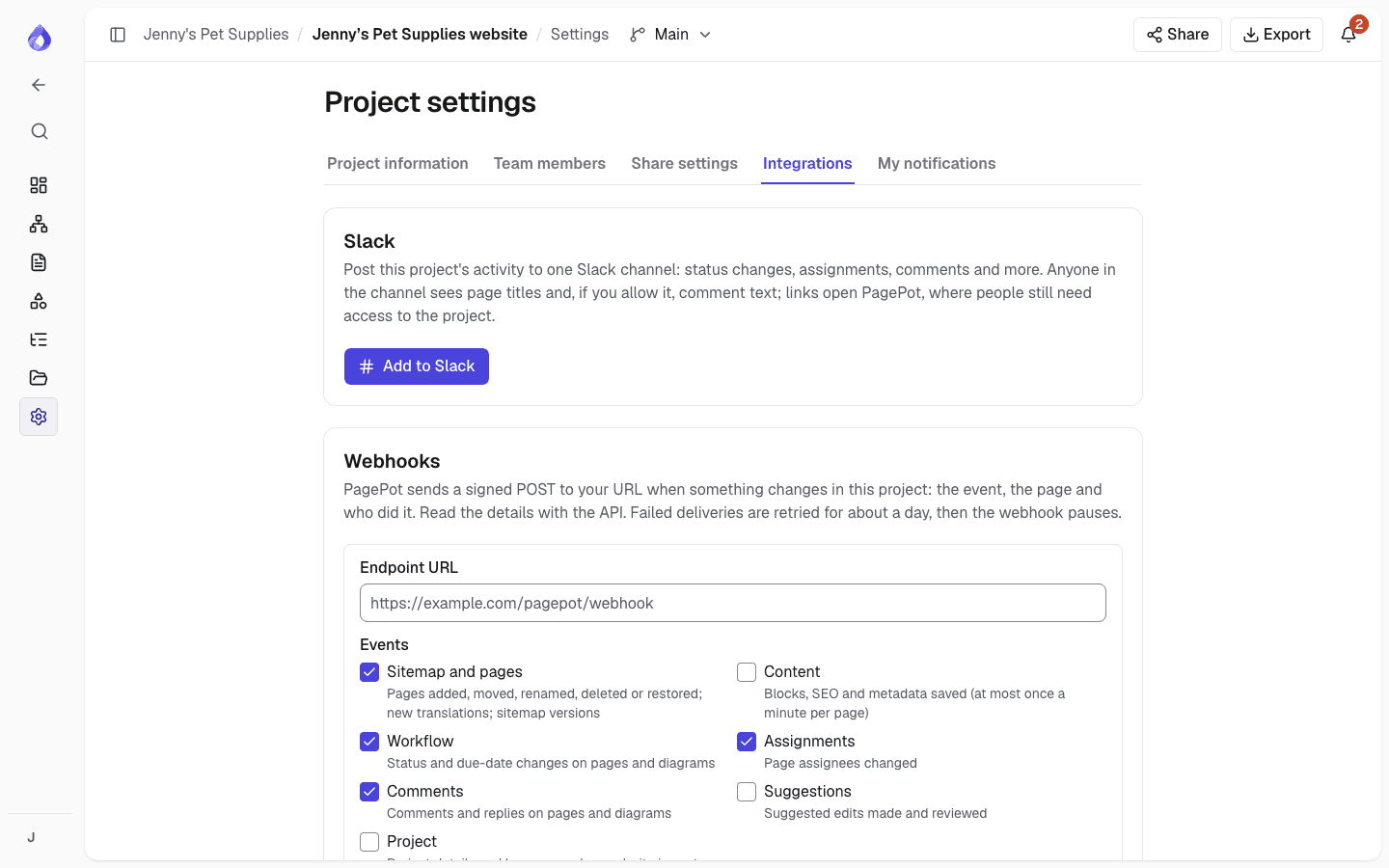
Project managers add up to 10 webhooks per project in Settings → Integrations, choosing events for pages, content, workflow, assignments, comments, suggestions and project changes. PagePot POSTs a small JSON body saying what happened; use the API to read the details.
- PagePot-Signature header with a timestamp and HMAC-SHA256 signature
- Retries after 1, 5 and 30 minutes, then 2, 6 and 12 hours, in order
- Paused after the last failed try, with a notification to project managers
- Send a test ping and see recent deliveries
The same rules as the app
Role-based access
An editor’s key can write content but not change the sitemap.
Page locks
If someone has a page open in the editor, content changes answer 423 so you can try again later.
Revision checks
Send the revision you read as expectedRevision; if the block changed since, you get 409 with the current value.
Idempotency keys
Send an Idempotency-Key header on writes and a retry within 24 hours returns the first answer instead of repeating the change.
Rate limits
600 reads and 120 writes a minute per key, with a Retry-After header when you go over.
Clear errors
Errors come back as a code and a message, with the issues listed for invalid requests.
Status rules
Statuses that lock editing and required fields before approval apply as usual.
Plan limits
Your plan’s limits apply to API changes just as they do in the app.
Translations
Content endpoints take a language parameter, and you can start translations.
A first request
Send your key in the Authorization header as a bearer token. A GET request to /api/v1/projects on your PagePot address returns the projects the key can see, as { "data": … }. From there, read a project’s sitemap at /projects/{id}/sitemap and a page’s blocks, SEO and status at /projects/{id}/pages/{pageId}.
Not available through the API yet: the AI assistant, diagrams, share links, and changing templates, statuses or team members.
Building an AI agent rather than a script? Point it at the MCP server instead: the tools describe themselves, and errors come back with a hint about what to do next.
What teams build with it
Keep product pages in step
Sync page content from a stock or product system, like Jenny's Pet Supplies keeping product pages current.
Rebuild staging on change
Trigger a staging build whenever a page’s content is saved, using a content webhook.
Report on progress
Feed a dashboard with page statuses, assignees and due dates across projects.
Frequently asked questions
Does PagePot have an API?
Yes. PagePot has a REST API at /api/v1 with personal API keys, on the Team and Agency plans. An OpenAPI description is at /api/v1/openapi.json.
How do I get an API key?
Open Settings → API and AI agents, name the key, choose read only or read and write and which projects it can access, then click Create key. Copy it straight away: it is shown only once.
Does PagePot have an MCP server?
Yes. AI agents connect to /api/mcp on your PagePot address, with OAuth or a personal API key. Reading works on every plan; editing needs the Team or Agency plan.
What are the API rate limits?
Each key can make 600 reads and 120 changes a minute. Beyond that the API answers 429 with a Retry-After header.
How do I verify a PagePot webhook?
Compute an HMAC-SHA256 of the timestamp, a dot and the raw body with your signing secret, compare it with the v1 value in the PagePot-Signature header, and reject old timestamps.
Can the API edit pages someone is working on?
No. If someone has the page open in the editor, content changes answer 423 (locked). Revision checks also stop you overwriting changes made since you read a block.
Is it safe to retry a request that timed out?
Yes, with an Idempotency-Key header. Sending the same request with the same key within 24 hours returns the first answer instead of repeating the change.