



Tree testing
Tree testing for the sitemap you are already planning
Find out whether people can find things in your site’s structure before anything is designed or built. Test one sitemap version, or compare two or three, and see which works better.


Navigation decided by opinion
Stakeholders argue over where pages belong, and the structure is settled by whoever argues longest. Testing it means copying the sitemap into another tool, and the copy is out of date by the next meeting.


Test the plan itself
In PagePot a tree test runs on your sitemap versions. Write a few everyday tasks, send a link, and get evidence for which structure people can actually use, without exporting anything.
No copying
The test uses the pages already on your sitemap. Each version’s tree is frozen at launch, so later edits don’t change what participants see.
A/B versions
Compare up to three sitemap versions. Each participant sees one, picked so every version gets about the same number of people.
Honest statistics
PagePot only names a better version when the difference is statistically significant. Otherwise it says so.
How a tree test works
Choose the versions
Start with the main sitemap, or tick up to three sitemap versions to compare, such as the current structure and a proposed one.
Write tasks and mark the answers
Write tasks the way a visitor thinks (“How much does delivery cost?”), then tick the correct page, and any acceptable ones, in each version.
Preview and launch
Take the test yourself without recording anything, then launch and copy the participant link.
Read the results
See how each version did on each task, where people ended up, and colour the sitemap by where they clicked.
What you get
A simple test for participants
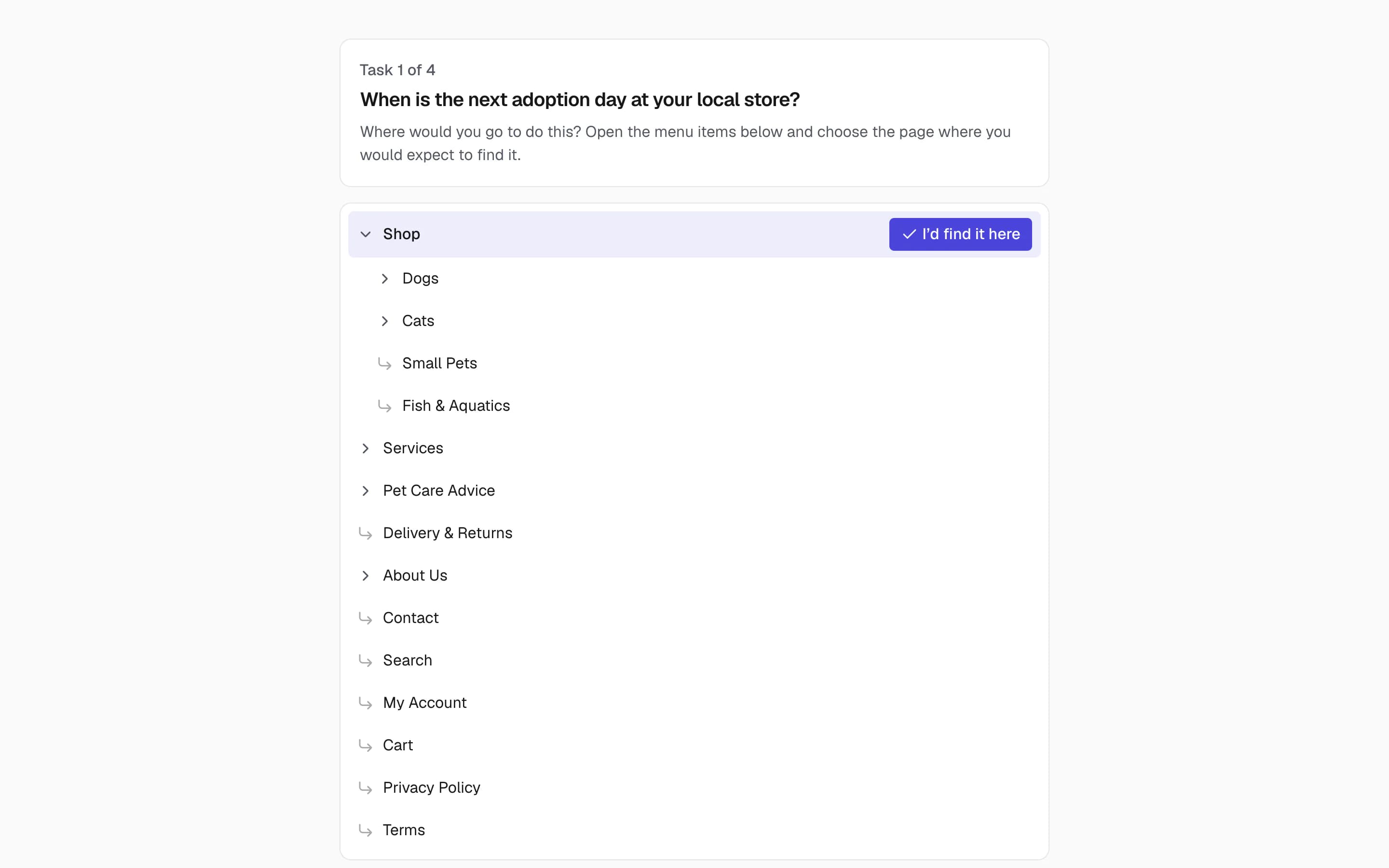
Participants open the link, read your welcome message and pick where they would go in a menu of page titles only. They don’t need an account and aren’t asked for an email address. If they leave halfway, they can carry on later on the same device.
- Optional password, close date and maximum number of participants
- Shuffled task order, an optional “How sure are you?” question and a closing question
- Page titles in the language of your choice on multilingual projects
- Your workspace branding on the participant pages
Results per task and per version
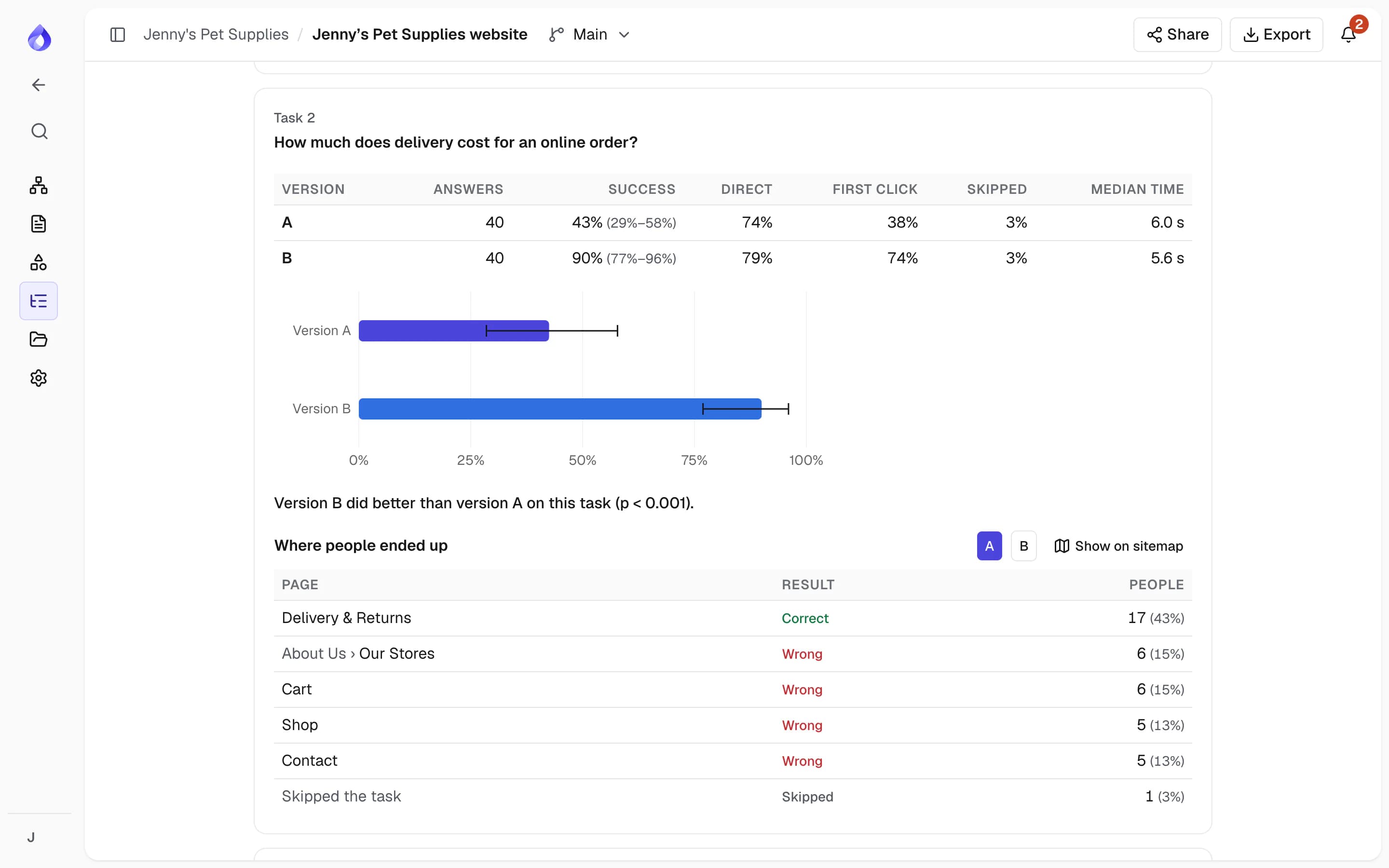
For each task and version: the success rate with a 95% range, how many went straight to the answer, whether the first click went into the right branch, skips and the median time. Every page people chose is listed, with the wrong ones in red.
- A plain-language verdict only when a difference is significant, corrected for the number of tasks and versions
- People who clicked through too fast, or didn’t finish, are left out and shown in the totals
- A notification when the number of completions you asked for is reached
See the results on the sitemap
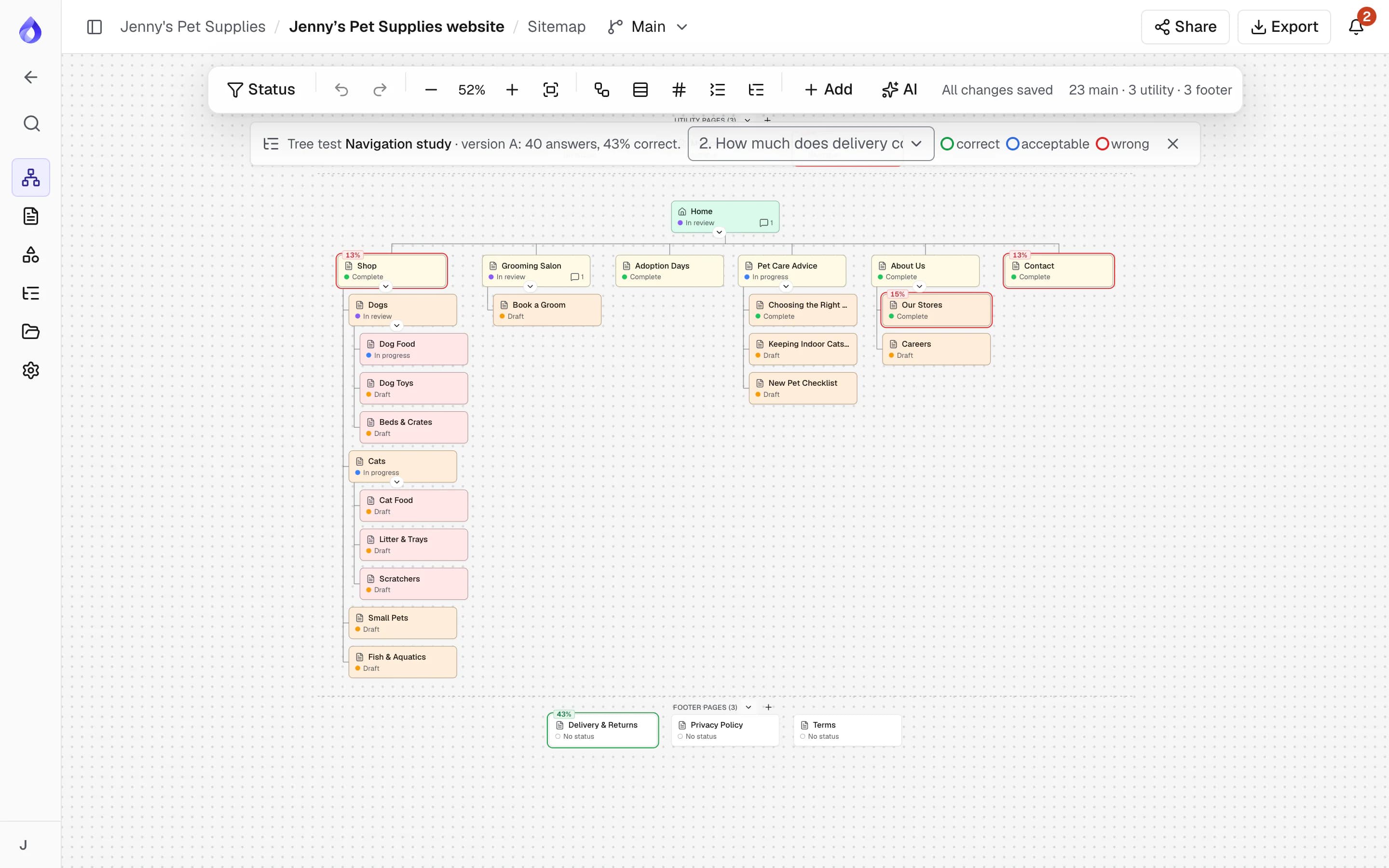
Show on sitemap opens that version’s map with the cards coloured for a task: green for correct pages, blue for acceptable ones and red for wrong ones, with the share of people who chose each.
More tree testing tools
Sitemap versions
Try a new structure in a separate version without touching the main one, then test them side by side.
Duplicate to test again
Copy a study with its versions and tasks, change what you learned, and run a second round.
CSV export
Download every answer, with the version, path, time and result, for your own analysis or report.
Tree export
Export a version’s tree as CSV in the indented format other tree-testing tools import.
Close and reopen
Stop taking answers at any time, or set a date, and reopen if you need more people.
Results for the whole team
Project managers run tests; everyone on the project can see the results.
Who uses tree testing
Agencies
Show the client evidence for the proposed navigation instead of asking them to take it on trust.
PagePot for agenciesGovernment and education teams
Record user research on the structure of a service or faculty site before it is built.
PagePot for governmentRedesign teams
Test the current structure against the new one, so the redesign is measurably easier to use.
Website redesignsFrequently asked questions
What is tree testing?
Tree testing checks whether people can find things in a site’s structure. Participants see only the page titles, as an expandable menu, and choose where they would go to do a task. Because there is no design or search, it tests the structure and the labels on their own.
Which plans include tree testing?
Tree testing is on the Pro, Team and Agency plans, and in the 14-day Pro trial. There is no extra charge per participant.
Can I compare two sitemaps (A/B testing)?
Yes. Create another sitemap version, then tick up to three versions in the tree test. Each participant sees one version, and the results compare them task by task.
How many participants do I need?
Aim for about 50 per version. With fewer people the ranges are wide, and PagePot won’t name a better version unless the difference is significant.
Do participants need an account?
No. They open the link and start. They aren’t asked for an email address, and you can protect the test with a password.
Do participants need to be recruited through PagePot?
No. PagePot doesn’t recruit participants. Send the link to your own users, customers or panel, by email, newsletter or a link on your current site.