API
Use personal API keys to read and change PagePot projects from scripts and other tools.
The PagePot API lets your own scripts and tools read and change projects: for example, a script that keeps product pages in step with Jenny's stock system, or a dashboard that shows how many pages are complete. It's on the Team and Agency plans, with the same access on both.
Create an API key
Open Settings → API and AI agents. Everyone in the workspace can create their own keys.
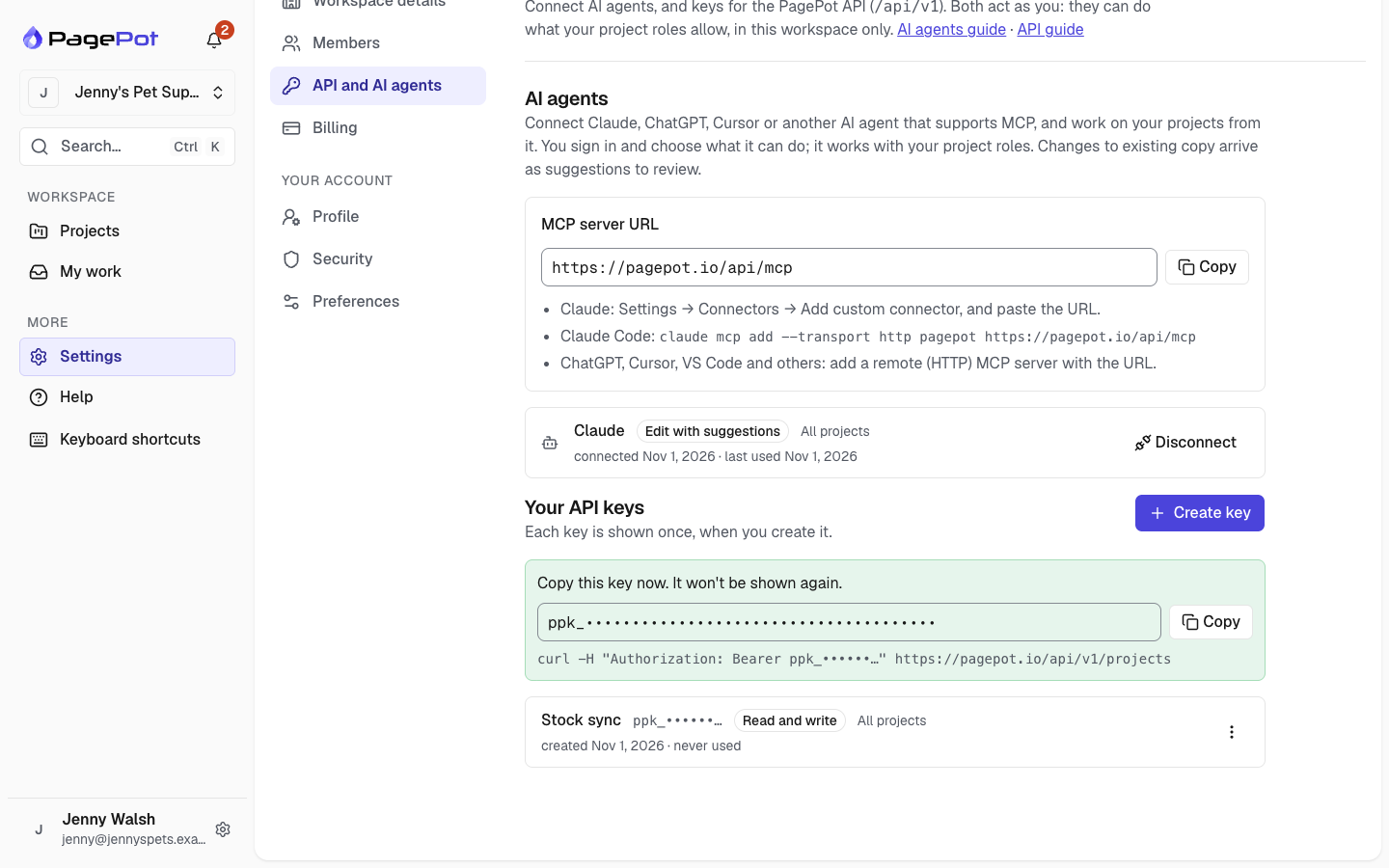
- Name the key after what uses it, such as "Stock sync".
- Access: Read only, or Read and write.
- Projects: all the projects you can access (including new ones), or only the ones you pick.
Click Create key and copy it: it's shown only once. Keys start with ppk_ and don't expire.
A key acts as you. It can only do what your project roles allow, in this workspace. If you are an Editor on a project, a key can write content there but not change the sitemap. The project history shows changes made with a key as yours, "via API".
Keep keys secret, like a password. Revoke a key you no longer need, or that may have leaked. Keys stop working when you leave the workspace, and while the workspace's plan doesn't include the API. Workspace admins see everyone's keys and can revoke them.
Make a request
Send the key in the Authorization header. The API is at /api/v1 on your PagePot address.
curl https://pagepot.io/api/v1/projects \
  -H "Authorization: Bearer ppk_your_key"
Responses are JSON: { "data": … }, or { "error": { "code": "…", "message": "…" } } when something goes wrong. The full description of every endpoint, in OpenAPI format, is at /api/v1/openapi.json; tools such as Postman can import it.
What you can do
| Resource | Endpoints |
|---|---|
| You and your key | GET /me |
| Projects | GET /projects, GET /projects/{id}, PATCH /projects/{id} |
| Sitemap | GET /projects/{id}/sitemap; add, change, move, delete and restore pages under /projects/{id}/pages |
| Page content | GET /projects/{id}/pages/{pageId} (blocks, SEO, metadata, status); add, save and remove blocks; save SEO and metadata; start translations |
| Workflow | Set a page's status, assignees and due-date |
| Comments | List, add, reply, edit and resolve |
| Reference | Templates, statuses, metadata schemas and members |
| Files | List, upload and download |
| Activity | The project's history, newest first |
| Webhooks | Add, change, test and delete webhooks |
Content endpoints take ?language= for other languages. Rich text is returned both as JSON (the editor's format) and as HTML. To save rich text, send either: value with the JSON, or html. HTML keeps what the editor supports (headings, lists, links, tables, bold and italic, images from the project and YouTube or Vimeo videos); anything else keeps only its text.
curl -X PUT https://pagepot.io/api/v1/projects/{id}/pages/{pageId}/blocks/{blockId} \
  -H "Authorization: Bearer ppk_your_key" -H "Content-Type: application/json" \
  -d '{"html": "<h2>Delivery</h2><p>Free over <strong>$60</strong>.</p>", "expectedRevision": 3}'
Suggest instead of edit
Add "mode": "suggest" when saving a rich-text block to propose the change as tracked suggestions, like Suggesting mode in the editor (Team plan and above). Editors then accept or reject it in the page editor. A block that already has pending suggestions answers 409 (SUGGESTIONS_PENDING); ask someone to review them first.
Not available through the API yet: the AI assistant, diagrams, share links, and changing templates, statuses or team members.
The same rules as the app
- Page locks: if someone has the page open in the editor, content changes answer
423(locked). Try again later. - Changes since you read: when you save a block, send the
revisionyou read asexpectedRevision. If someone changed the block since, you get409with the current value, so you never overwrite their work. - Statuses that lock editing, required fields before approval, and your plan's limits apply as usual.
Safe retries
If a request times out, you can't always tell whether the change happened. Send an Idempotency-Key header (any unique string, such as a UUID) on writes: if you send the same request with the same key again within 24 hours, PagePot doesn't repeat the change; it returns the first answer, with the header Idempotent-Replayed: true. Using the key for a different request answers 422, and retrying while the first request is still running answers 409.
Limits
Each key can make 600 reads and 120 changes a minute. Beyond that you get 429 with a Retry-After header. Each person can have up to 25 keys.
Common errors
| Status | Meaning |
|---|---|
| 401 | Missing, unknown or revoked key |
| 403 | Your role or the key's access doesn't allow it, or the plan doesn't include the API |
| 404 | Not found, or not in the key's projects |
| 409 | Changed since you read it |
| 422 | The request isn't valid; error.issues says what's wrong |
| 423 | Someone is editing the page, or its status locks editing |
| 429 | Too many requests |

