AI agents (Claude, ChatGPT and others)
Connect Claude, ChatGPT, Cursor or another AI agent to PagePot over MCP, and work on your projects from it.
You can connect your own AI agent, such as Claude, ChatGPT, Cursor or Claude Code, to PagePot and ask it to work on your projects: "Plan a sitemap for Jenny's new grooming service", "Draft the empty pages in the Dog food section" or "What's due this week?". Agents connect through MCP (Model Context Protocol), the standard most AI tools use.
- Reading (projects, sitemaps, pages, comments, files) works on every plan.
- Editing needs the Team or Agency plan.
Connect an agent
Open Settings → API and AI agents and copy the MCP server URL. Then add it in your agent:
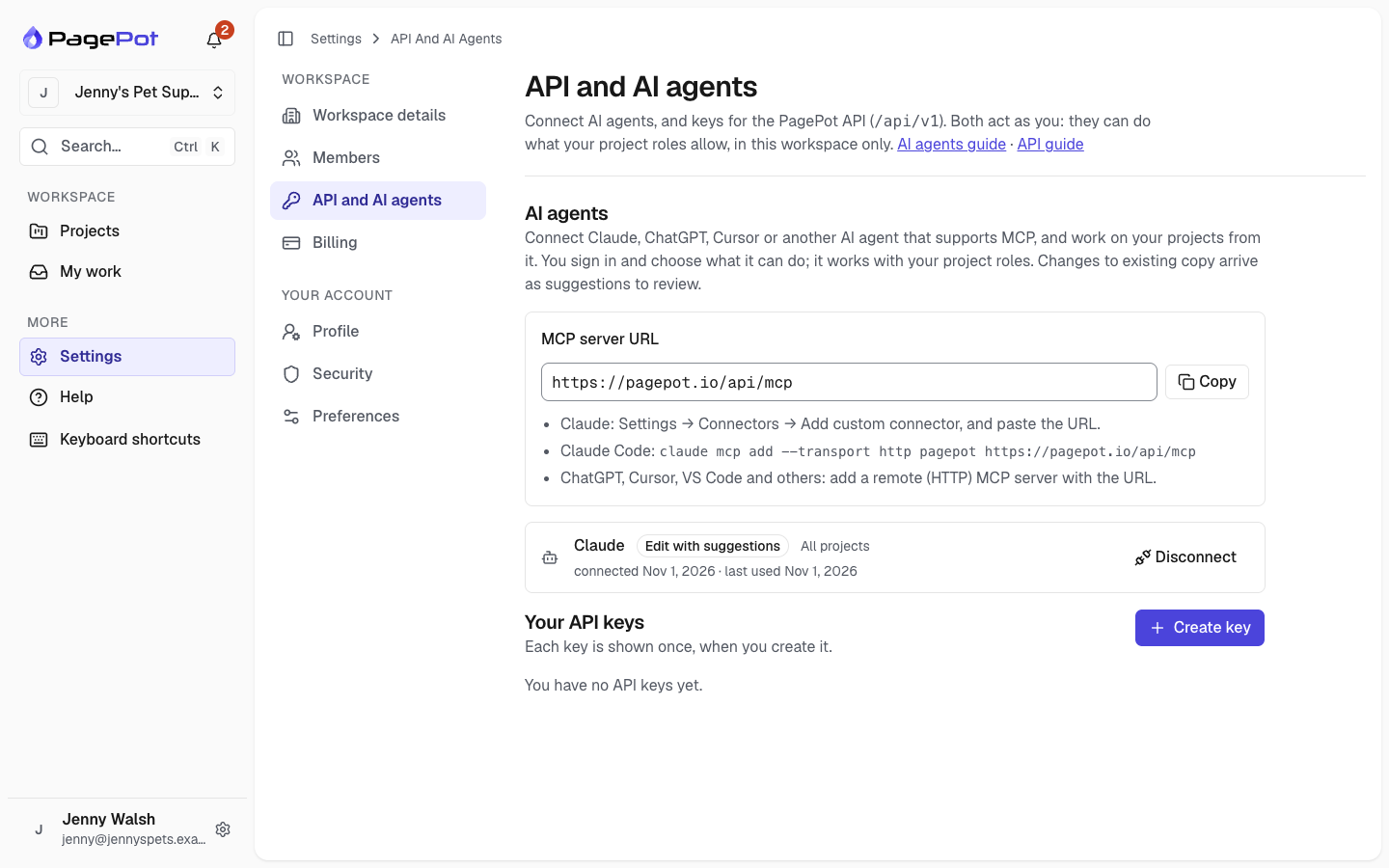
- Claude (web and desktop): Settings → Connectors → Add custom connector, and paste the URL.
- Claude Code:
claude mcp add --transport http pagepot <server URL> - ChatGPT, Cursor, VS Code and others: add a remote (HTTP) MCP server with the URL.
The agent opens PagePot in your browser. Sign in if you need to, then choose:
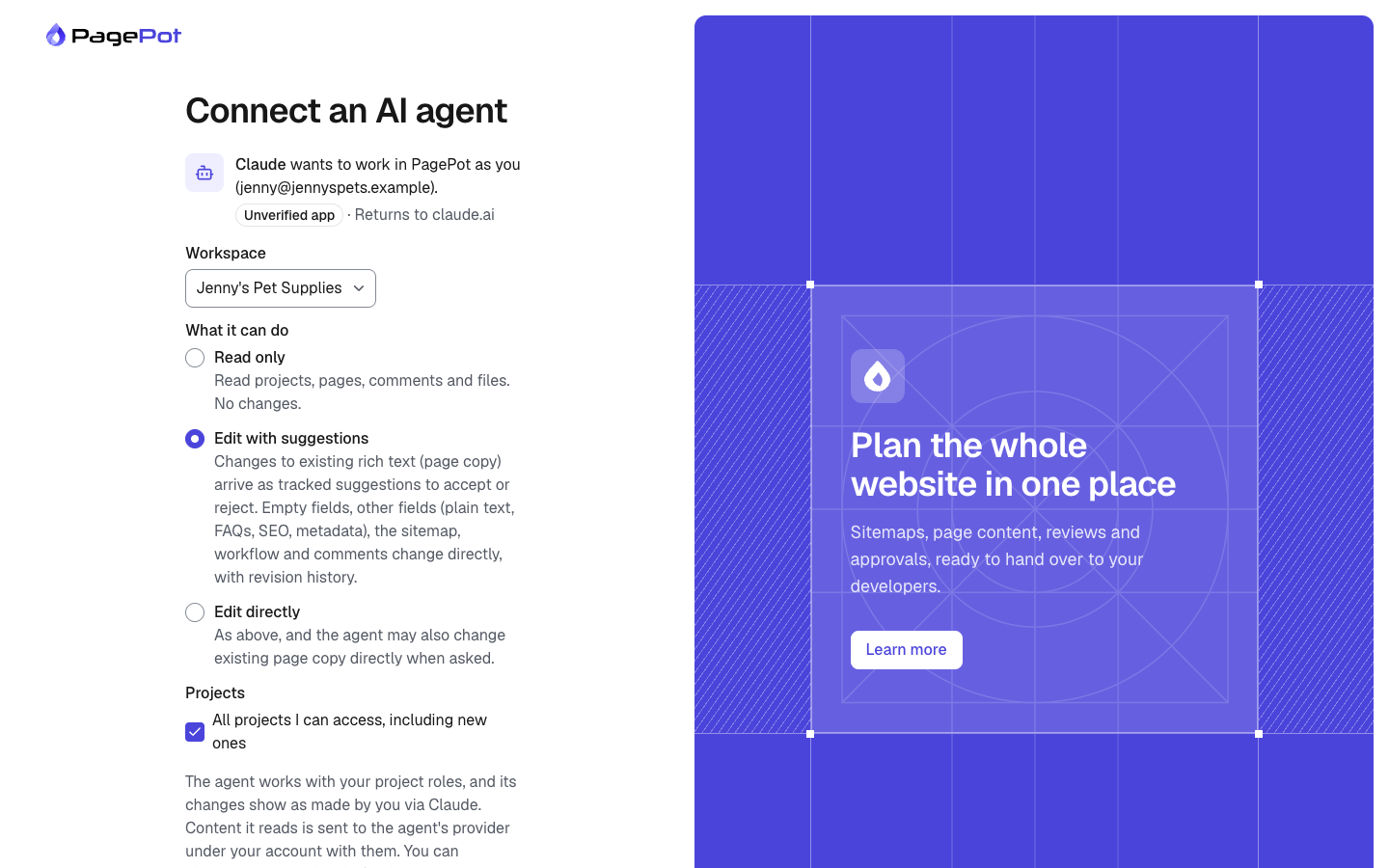
- Workspace: the workspace the agent works in.
- What it can do:
- Read only: it reads, and changes nothing.
- Edit with suggestions (recommended): when it changes page copy (rich text) that's already written, the changes arrive as tracked suggestions that you accept or reject in the page editor. It fills empty fields, and changes other fields (plain text, FAQs, SEO, metadata), the sitemap and workflow, and comments directly; page revisions keep the earlier versions.
- Edit directly: as above, and it may also change written copy directly when you ask it to.
- Projects: all the projects you can access, or only the ones you pick.
Click Allow, and go back to your agent.
An agent acts as you. It can only do what your project roles allow: if you are an Editor on a project, it can write content there but not change the sitemap. Its changes show in the project history as yours, "via Claude" (or the agent's name). If someone has a page open in the editor, the agent waits rather than overwriting their work.
What agents can do
| Ask for | For example |
|---|---|
| Find things | "Which pages in Jenny's project are still in Draft?" |
| Plan | "Plan a sitemap for a pet grooming site and create it as a new project" (it shows you the page list first) |
| Write | "Draft the Puppy food page from its notes and the project brief" |
| Review | "Review the Contact page for plain English and missing fields, and leave comments" |
| Organise | "Move the FAQ under Help, and assign the dog food pages to Sam due Friday" |
| Translate | "Start the French version of the About page and translate it" |
Agents follow the project's AI assistant brief (Project settings → Project information: purpose, audience, tone, style rules), so write it once and every agent uses it. In Claude, the /review_page, /plan_sitemap and /draft_page prompts start these jobs for you.
Agents can't upload files, edit diagrams or tree tests, change project settings, or invite people.
Disconnect an agent
Settings → API and AI agents lists your connected agents. Click Disconnect to stop one at once. Agents also stop working when you leave the workspace. Workspace admins see everyone's agents and can disconnect them, and can turn agent connections off for the whole workspace in Settings → Workspace details.
Your data
When an agent reads a page, the content goes to that agent's provider (Anthropic for Claude, OpenAI for ChatGPT) under your own account with them, following their terms. Only connect agents you trust, and use Read only or pick projects when you don't need more.
Developers can also connect with an API key: send it as Authorization: Bearer ppk_… to the MCP server URL.

